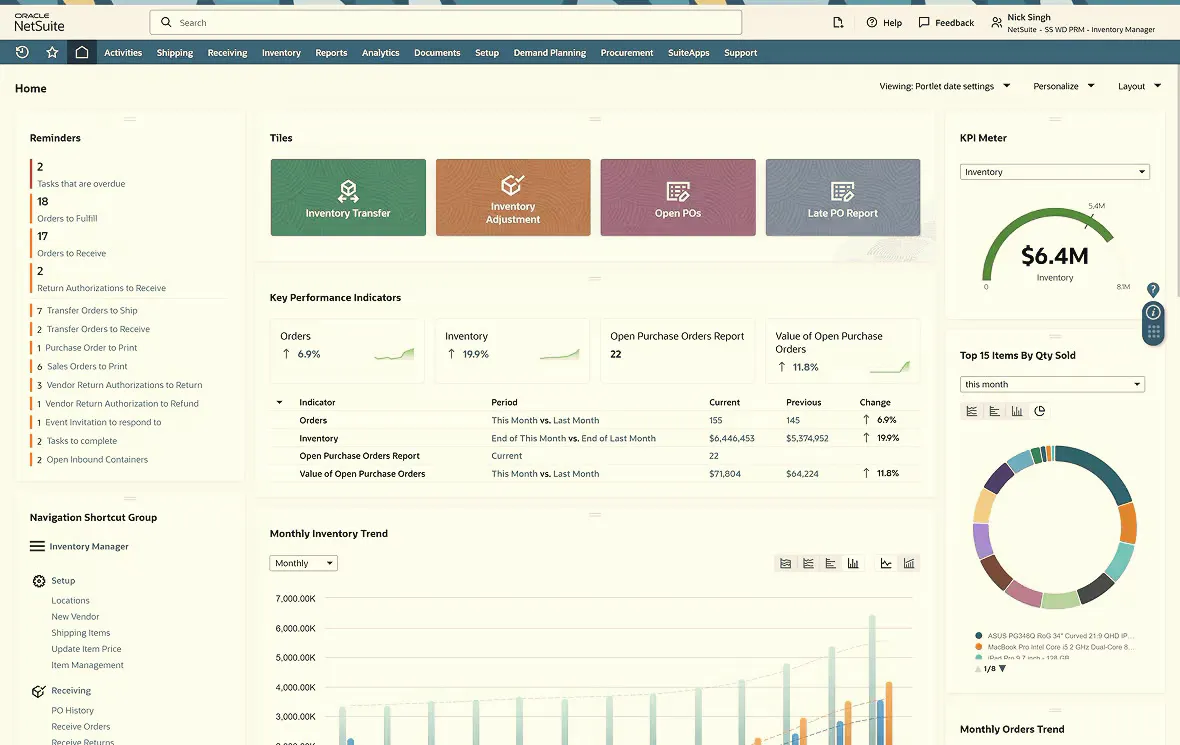

NetSuite hides a trove of keyboard shortcuts, search prefixes, and navigation tricks that can seriously speed up your daily work. This guide rounds up the most useful ones, from record prefixes and search characters to date-entry shortcuts, global search, and dashboard tips.
NetSuite is a powerful ERP (Enterprise Resource Planning) system, but navigating its vast features can be time-consuming. Luckily, there’s a treasure trove of hidden NetSuite shortcuts waiting to be discovered! These shortcuts can significantly boost your productivity and streamline your daily tasks in NetSuite.
In this blog post, we’ll unveil some of the most valuable NetSuite shortcuts that will transform you into a NetSuite ninja.
Key NetSuite Terminology
- Shortcuts – Links to frequently used records, transactions, lists and/or reports.
- KPIs (Key Performance Indicators) – Critical business metrics distilled from data
- Navigation Portlet – SuiteApp containing commonly used menus to simplify navigation
- Search Prefixes – Record type keyword to narrow results of global search
NetSuite Keyboard Shortcuts for Champions
Record Prefix Type
| Prefix | Record Type | | --- | --- | | cam | Campaign | | cash | Cash Sale | | con | Contact | | cust | Customer | | emp | Employee | | est | Estimate | | ev | Event | | exp | Expense Report | | fi | File | | invo | Invoice | | iss | Issue | | it | Item | | opp | Opportunity | | par | Partner | | ph | Phone Call | | ret | Return Auth | | sales | Sales Order |
Search Characters
| Character | Use | | --- | --- | | % | Wildcard | | + | Includes Inactive Records | | “ “ | Finds Exact Matches | | OR | Multiple Text Searches | | :: | Opens Result in New Window | | Capital First Prefix Letter | Opens Result in Edit Mode |
Date Entry
| Character | Use | | --- | --- | | t | Today’s Date | | y | Yesterday’s Date | | T (Uppercase T) | Tomorrow’s Date | | m | Last Day of the Month | | + | Increase by One Day | | – | Decrease by One Day |
Global Search (Alt + G): Need to find something quickly? Bypass the menus and jump straight to the global search bar with this shortcut.
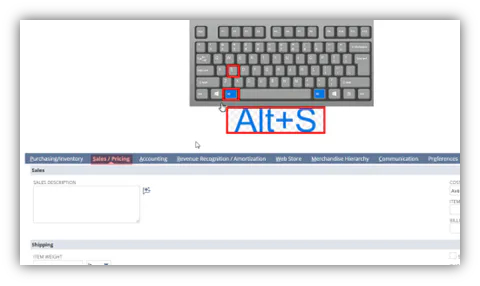
Subtab Navigation (Alt + Letter): Effortlessly navigate between subtabs on forms by holding Alt and pressing the corresponding letter key for the subtab.
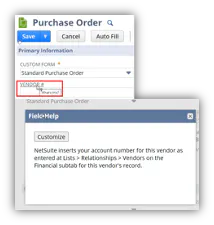
Field Level Help: NetSuite offers convenient field-level help throughout the platform, simply hover your mouse over the field label (the text next to the field) and click on it. A pop-up window will appear, providing a clear explanation of the field’s purpose and how to use it effectively.
The Help Center: On every page, selecting Help will provide access to information. Depending on where you are in NetSuite, the Help icon is intuitive and goes right to the spot in Help to guide you.
SuiteAnswers
NetSuite SuiteAnswers has knowledge base documentation, webinars, videos for all topics for NetSuite.
- Navigate to Support > Go to SuiteAnswers
- Type in keywords like sales orders or customers
Mastering Navigation
Dashboard Shortcuts: Tired of clicking through menus? Add frequently used reports, transactions, or custom searches directly to your dashboard for instant access.
Saved Searches: Don’t waste time recreating common searches. Utilize the “Saved Searches” feature to quickly pull up frequently needed information.
Form Completion & Data Entry
Tab Completion: Leverage the power of tab completion!
Tab: Move between fields on the form.
Shift + Tab: Move to the previous field.
Bulk Editing: Dealing with a list of records that require minor changes? Use the mass update feature to update multiple records simultaneously for efficient data management.
These are just a few of the many NetSuite shortcuts available. Explore the NetSuite Help Center or consult your system administrator to discover even more time-saving tricks!
By incorporating these shortcuts into your routine, you’ll be well on your way to NetSuite mastery and a more efficient workday!
Get more out of NetSuite
From shortcuts to full-scale optimization, our NetSuite experts help your team work faster in the platform.
Book a demo